Async runtimes were first introduced to me by my very old friend, JavaScript. Promise resolution was one of the most interesting topics JavaScript has to offer, not to mention implicit type coercion. In this note, I’ll cover the topic from callbacks, promises and asyc/await and try to make sense of why it existed.
Setting up the problem
To understand this, let’s build something concrete: an input that reads a file and displays its text content on screen but only if the file size is under 2KB. Try it yourself, or follow the rundown below. It’s pretty basic.
const file = document.getElementById("file");

// this itself is driven by the event loop of the browser
file.addEventListener('input', (event) => {
    let target = event.target.files[0];
    if (target == null) {
        return;
    }
})
Okay, we’ve got the file we want. Now we need to read it. WebKit already gives us the FileReader object for this, and it too has event listeners and async behavior. Let me show you.
function read_file(file) {
    // we create a reader
    let reader = new FileReader();
    // and we read it
    reader.readAsText(file);
    // now where's the output?

    // here it comes again — the event handler.
    // this function only gets called once readAsText completes!
    reader.addEventListener('load', (event) => {
        const item = document.createElement("p");
        item.textContent = event.target.result;
        document.body.appendChild(item);
    });
}
Easy peasy. Drop this read_file inside the file input’s event handler and it works perfectly, it reads the content and appends a new child to the DOM. Still, one piece of the puzzle is missing: checking the file size and only displaying the content if it’s under the threshold.
How do we do that? Simple use file.size. It returns the file’s size in bytes, but make sure the check happens before we start reading the file, otherwise the guard is useless. Alright gng time to write your own logic!
const file = document.getElementById("file");

// this itself is driven by the event loop of the browser
file.addEventListener('input', (event) => {
    let target = event.target.files[0];
    if (target == null) {
        event.target.value = ""
        return;
    }
    read_file(target)
    console.log("I will appear second!");
})

function read_file(file) {
    // even the reader here is an asynchronous function that accepts callbacks for later
    let reader = new FileReader();

    reader.addEventListener('load', (event) => {
        const item = document.createElement("p");
        item.textContent = event.target.result;
        document.body.appendChild(item);
        console.log("I will appear fourth!");
    });

    reader.addEventListener('progress', (event) => {
        console.log("I will appear third!");
    });

    function success() {
        reader.readAsText(file); // this consumes the bytes
        console.log("I will appear first!");
    }

    function failure() {
        console.error("NOT DONE!");
    }

    check_file_size(file, success, failure);
}

function check_file_size(file, success_callback, failure_callback) {
    if (file.size > 1024 * 2) {
        failure_callback();
        return;
    }
    success_callback();
}
Now, trace the flow of the program:
- The input event callback is registered first.
- Once it receives input, it triggers and jumps into the
read_filefunction. - We hook the
loadandprogressevents for the file. - These are only registered — nothing executes yet.
- Execution moves to
check_file_size, passingsuccess_callbackandfailure_callback. - If the file is under the threshold, we call
success_callback. read_filefinishes oncecheck_file_sizecompletes.- That’s why the call that was holding
read_file(target)inside the input handler releases control. - The line
console.log("I will appear second!")prints. - The listeners we registered earlier don’t affect the synchronous nature of the program — they’re just waiting.
- Eventually, the
progressevent fires and its callback runs. - Finally, the file finishes loading and the
loadevent’s callback runs.
From callback hell to promises
Now, look we used callback functions here. One of the biggest advantages of promises is resolving exactly this kind of pattern.
function main() {
    const s_c = (settings, another_cb) => another_cb();
    const f_c = () => {};
    load_extension(settings, s_c, f_c)
}

function load_extension(settings, success_callback, failure_callback) {
    const another_cb = () => {};
    const s_c = () => success_callback(settings, another_cb);
    check_available_plugins(settings, s_c, failure_callback)
}

function check_available_plugins(settings, success_callback, failure_callback) {
    success_callback();
}
This can get very complicated very fast, hence the name pyramid of doom, or callback hell. And here comes the Promise to the rescue.
// syntax of a promise
promise = new Promise((resolve, reject) => {
    // do some asynchronous work

    if (done) {
        resolve(value);
    } else {
        reject(value);
    }
})

promise.then(
  (result) => {
    // Handle success
  },
  (error) => {
    // Handle error
  }
);
Now here’s our previous code, reduced to use a promise instead of success_callback/failure_callback, much simpler and more readable.
// inside read_file()

check_file_size(file).then((value) => {
    console.log(value);
    reader.readAsText(file); // this consumes the bytes

    // if this itself returned a promise, we could chain another .then() here

    console.log("I will appear first!");
}).catch((value) => {
    console.error(value);
});

// --- snip ---

function check_file_size(file) {
    return new Promise((resolve, reject) => {
        if (file.size > 1024 * 2) {
            reject("NAH!");
            return;
        }
        resolve("YAY!");
    })
}
Now check_file_size is no longer a sync function, it’s asynchronous. Run the program again and you’ll notice that everything after the check_file_size(...).then(...) call logs first, because nothing inside read_file itself is holding up the thread anymore.
Phew, after all that code, we’ve finally arrived at the asynchronous nature of JavaScript. The promise we just wrote can be resolved more directly using async and await. If a function returns a promise, we can await it to get its future value.
// instead of a long chain of .then() and .catch(),
// we can write something like:

const value = await check_file_size(file);
// execution pauses here until the promise settles
// but what if the promise is rejected? that's why it's wrapped in try/catch —
// catch gets the rejected value

try {
    const value = await check_file_size(file);
    // now do whatever the success_callback used to do here
    // note: if you don't await here, you'll never know if this succeeded
    // inside this function — await is what gives you the synchronous-looking flow
} catch (err) {
    // do cleanup
    // error handling
}
And because of this, we don’t await inside the input event listener itself we just want read_file to resolve on its own, without holding up that event.
Here’s the crucial point to remember: because read_file is an I/O-bound operation, the browser’s own native subsystems (networking stack, I/O stack, timers collectively the Web APIs) handle the actual waiting. So when we don’t await read_file, its work happens off the JS thread, the JS call stack empties immediately, and our event loop doesn’t block on any other events. Once the work is done, the browser pushes a load event, and our JS event loop picks it up and runs the callback.
file.addEventListener('input', (event) => {
    let target = event.target.files[0];
    if (target == null) {
        event.target.value = ""
        return;
    }
    read_file(target)
    console.log("I will appear first!");
})
When things actually block
Now, compare that to a CPU-bound task one that runs directly on the JS thread instead of being offloaded to a native subsystem outside the JS runtime. That’s a problem, because now the single JS thread is stuck doing the calculation. The call stack never clears, the event loop can’t process anything else, and we can’t respond to any other event.
function count_to_quadrillion() {
    for (let i = 0; i <= Infinity; i++) {
        // just churns the CPU, forever
    }
}

file.addEventListener('input', (event) => {
    let target = event.target.files[0];
    count_to_quadrillion();
})
And even if you write async function count_to_quadrillion(), it makes no difference, this function has zero yield points.
A yield point is a moment where a function pauses and hands control back, instead of running start-to-finish in one go.
There isn’t a single line in count_to_quadrillion that pauses execution - no await, no setTimeout, nothing. The only way this function ever hands back control is by finishing entirely (which, with an infinite loop, never happens).
Compare that to this, which does have a yield point:
async function read_file(file) {
    const value = await check_file_size(file);   // <-- yield point is here
    reader.readAsText(file);
}
When execution hits that await, JS effectively says: “this promise isn’t resolved yet, let me pause right here, remember where I was, and let the event loop do other things. I’ll come back to this exact spot once the promise resolves.”
One more thing worth calling out: await only controls that particular block of a function. Regardless of whether you await it, an async function is still triggered and run by the JS runtime the moment it’s called await only decides whether the caller holds and waits for the result, or moves on immediately.
Under the hood: the JS runtime
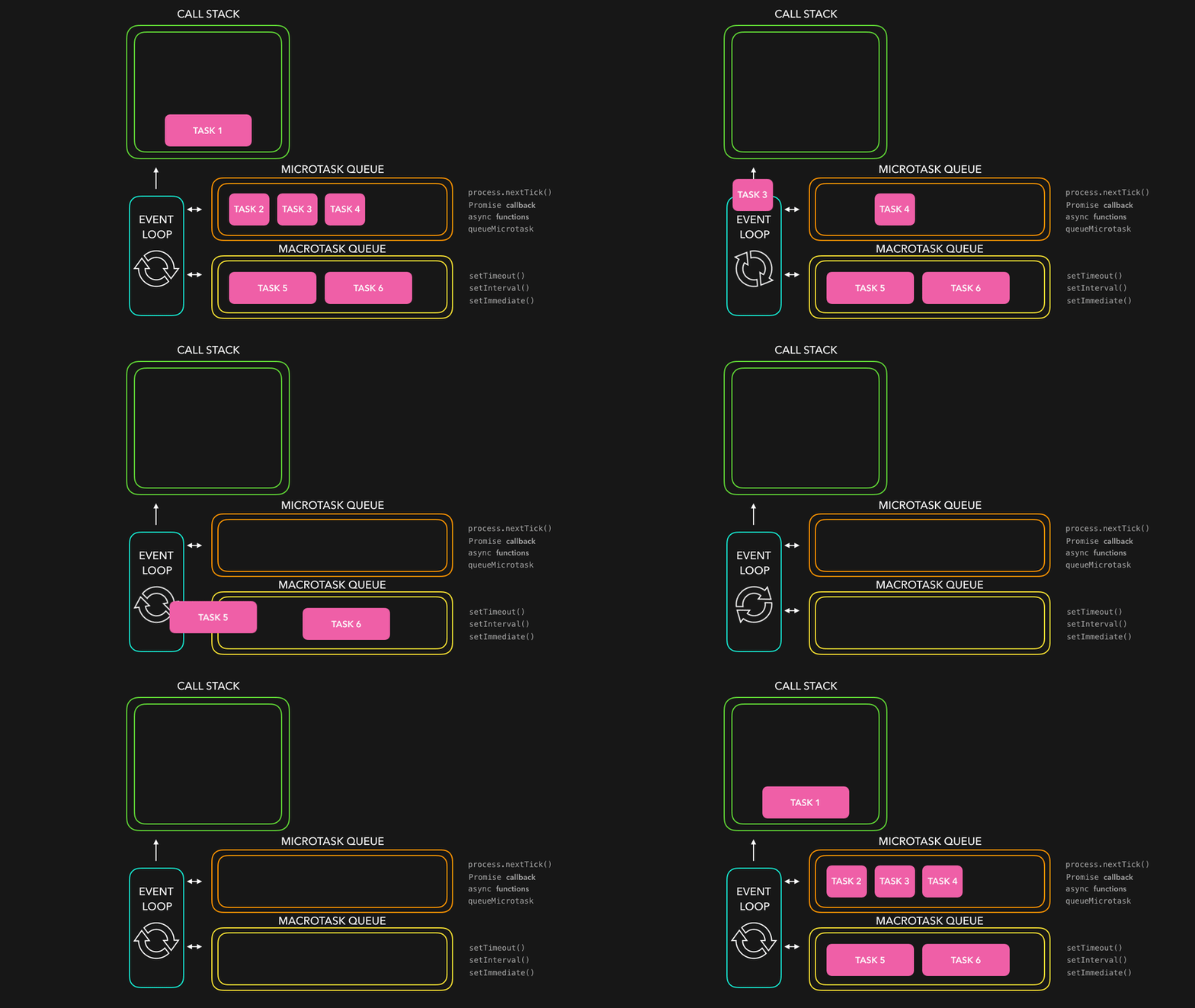
Since I’ve mentioned the “JS runtime” a few times now, let’s actually go under the hood. The JS runtime is more commonly known as the event loop, and it’s made up of several parts:
- JS Engine (V8 / SpiderMonkey) : runs your actual JS code. One thread, one call stack. This is what executes
count_to_quadrillion(), or the synchronous parts ofread_file(). - Web APIs :
fetch,FileReader,setTimeout, DOM events. Implemented in the browser’s native code (C++), these are what actually do the waiting, off the JS thread. - Task Queue (a.k.a. Callback Queue, or Macrotask Queue) : when a Web API finishes its work, its callback lands here rather than jumping straight onto the call stack.
- Microtask Queue : where promise callbacks (
.then(),awaitcontinuations) land. This queue is drained first and has higher priority than the Task Queue. - The Event Loop : the mechanism tying it all together. It continuously asks: “Is the call stack empty? If yes, drain the microtask queue completely, then take exactly one item from the task queue, run it, and repeat : forever.”
So the typical order of priority, once the call stack clears, is:
**call stack > microtask queue (fully drained) > one task from the macrotask queue
You can see this visualized here: visualization
The natural next question
At this point you might be wondering: what if I actually want count_to_quadrillion to run separately, without blocking the JS event loop and call stack at all?
That’s exactly what Web Workers are for - they give you a genuinely separate OS thread, with its own JS engine instance, so heavy computation doesn’t block the main thread at all.
That’s a big enough topic to deserve its own post - including the deeper question of how we could build something like this ourselves, with our own waker, executor, channel, and so on. We’ll get there.
Hopefully, this gave you the essence of how JavaScript achieves its asynchronous nature through the event loop, the call stack, and its two queues.